Ok since poeple wanted to figure out how i cast my stream and how i do it on the pc. First things first this method will not kill your ram or computer like webcammax does. second thing you need to have atleast about 50-120 bucks for this method or more if you don't have a Video Card. Ok enough of that lets get this started.
Things Needed:
One a Video Capture card with A s-video or composite (easier with S-Video )
Note: If you only get one with composite video then will need a adapter to plug into the graphics card and then you can use composite.
Ex: WinTV-PVR-150 MCE

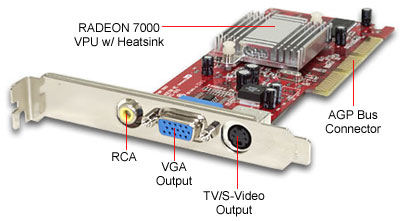
Two you need a Graphics card with a S-video on it
Having a good card is the best for streaming
Ex:

Now last thing is the S-Video Cable
Ex:

Now for how to set it up.
1. Install the Capture card into the PCI slot and install all the drivers for it.
2.Make sure you have the lastest drivers for your video card.
3.Make sure your Video card can use Clone mode
4.plug the S-video cable into your capture card and the other side into your Computers Video card.
5. Right click on your desktop and click the control panel for your card if you have it on a right click if not go into control panel and look for it.

5a. Then in the control panel look for Multi Setup or Set up multiple display

5b. Now click on clone mode or same o

n both Display
5c. Now apply and the screen will change and accept the changes.
6. Make the resolution higher when your done.
7.Then download Flash Media Encoder
Flash Media Encoder:
Ok in flash media encoder you will see nothing on the preview screens so don't freak out. Now in capture device select the Capture Card you use and then click the Wrench next to it. if you see the tab crossbar go their and you will see tuner in on one of the selections. select down and you hopefully see S-video in click that and click ok. You should then see your desktop on both Preview screens. Now if you don't know much about FME ( Flash Media Encoder) then don't worry i will help you out their on.