Monday, August 4, 2008

Game List

Pc Games

  • America's Army
  • Alien Swarm
  • And Yet It Moves
  • Aquaria
  • ARMA: Combat Operations
  • Audiosurf
  • Assassin's Creed
  • Amnesia: The Dark Descent
  • Black and White 2
  • Beat Hazard
  • Bioshock
  • Bit.Trip BEAT
  • Braid
  • Battlefield 2 Mods: Project Reality
  • BattleField 2142
  • Battlefield: Bad company 2
  • Battlefield: Bad Company vietnam
  • Battlefield 3 (on Pre-order)
  • Battle For Middle Earth
  • Battle For Middle Earth 2
  • Crysis
  • Crysis Warhead
  • Crysis Wars
  • Caesar III
  • Counter Strike 1.6
  • Counter Strike Source
  • Counter Strike Condition Zero
  • Call Of Duty
  • Call Of Duty 2
  • Call Of Duty 4
  • Call Of Duty: Mondern Warfare 2
  • Call Of Duty: World at War
  • Call Of Duty: Black Ops
  • Command and Conquer: Generals
  • Command and conquer: Zero Hour
  • Dark Messiah Might and Magic
  • Darkest Hour: Europe '44-'45
  • Dawn of War 2
  • Dawn of War 2 : Chaos rising
  • Day of Defeat 1.6
  • Day of Defeat source
  • Doc Clock: The toasted Sandwich of Time
  • Dragon Age: Origins
  • Dragon Age: 2
  • Dead Space
  • Dead Space 2
  • Eufloria
  • Final Fantasy 11 : Online
  • Far Cry
  • Far Cry 2
  • F.E.A.R
  • F.E.A.R 2
  • Fallout
  • Fallout 2
  • Fallout: Tactics
  • Fallout 3
  • Fallout New Vegas
  • GTA:SA
  • GTA:SA_MP
  • GTA VI
  • Garry's Mod
  • Gish
  • Half-Life
  • Half-Life: Opposing Forces
  • Half-Life: Blue Shift
  • Half-Life: Deathmatch
  • Half-Life 2
  • Half-Life 2 Episode 1
  • Half-Life 2 Episode 2
  • Half-Life 2 Mods
  • Hellgate London
  • Halo
  • Iron Grip: Warlord
  • Jade Empire: Special Edition
  • Jolly Rover
  • Joint Ops
  • Joint Ops: Escalation
  • Killing Floor
  • Knights Of The Old Republic
  • Left 4 Dead
  • Left 4 Dead 2
  • Lugaru HD
  • Lord Of The Rings: Online
  • League of Legends
  • Movies, The
  • Machinarium
  • Magic: The Gathering - Duels of the Planeswalkers
  • Mare Nostrum
  • Medal of Honor
  • Metro 2033
  • Natural Selection 1 & 2
  • Operation Flashpoint: Dragon Rising
  • Osmos
  • Penumbra: Overture
  • Polynomial
  • Puzzle Agent
  • Portal
  • Portal 2 (soon)
  • Recettear: An Item Shop's Tale
  • Red Orchestra: OStfront 41-45
  • Revenge of the Titans
  • Rhythm Zone
  • Ricochet
  • Red Faction
  • Rose Online
  • Star Wars Jedi Academy
  • Star Wars Battle Front 2
  • Star Wars Battle Front
  • S.T.A.L.K.E.R: Shadows, Clear Sky, Call of pripyat
  • Shadowgrounds
  • Shadowfrounds: Survivor
  • Shattered Horizon
  • Supreme commander 2
  • StarCraft 2
  • StepMania
  • Team Fortess
  • Team Fortess 2
  • Torchlight
  • Trine
  • VVVVVVV
  • Unreal tournament 2004
  • Unreal 3
  • World Of Warcraft
  • World of Goo
Xbox 360
  • GTA 4
  • Halo 3
  • Rainbow Six: Vegas 2
  • Call of Duty: Black ops (On Rent)
  • Homefront: On rent
PS3
  • Metal Gear Solid 4
  • Disgaea 4
  • Hyperdemisia Neptunia
  • Portal 2 ( Soon )

Friday, July 25, 2008

How to Capture your PC for Streaming

Ok since poeple wanted to figure out how i cast my stream and how i do it on the pc. First things first this method will not kill your ram or computer like webcammax does. second thing you need to have atleast about 50-120 bucks for this method or more if you don't have a Video Card. Ok enough of that lets get this started.

Things Needed:

One a Video Capture card with A s-video or composite (easier with S-Video )
Note: If you only get one with composite video then will need a adapter to plug into the graphics card and then you can use composite.
Ex: WinTV-PVR-150 MCE


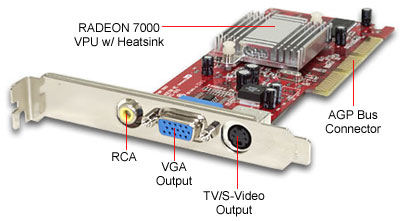
Two you need a Graphics card with a S-video on it
Having a good card is the best for streaming
Ex:


Now last thing is the S-Video Cable
Ex:


Now for how to set it up.
1. Install the Capture card into the PCI slot and install all the drivers for it.
2.Make sure you have the lastest drivers for your video card.
3.Make sure your Video card can use Clone mode
4.plug the S-video cable into your capture card and the other side into your Computers Video card.

5. Right click on your desktop and click the control panel for your card if you have it on a right click if not go into control panel and look for it.


5a. Then in the control panel look for Multi Setup or Set up multiple display


5b. Now click on clone mode or same on both Display


5c. Now apply and the screen will change and accept the changes.

6. Make the resolution higher when your done.
7.Then download Flash Media Encoder


Flash Media Encoder:

Ok in flash media encoder you will see nothing on the preview screens so don't freak out. Now in capture device select the Capture Card you use and then click the Wrench next to it. if you see the tab crossbar go their and you will see tuner in on one of the selections. select down and you hopefully see S-video in click that and click ok. You should then see your desktop on both Preview screens. Now if you don't know much about FME ( Flash Media Encoder) then don't worry i will help you out their on.